
Soundboard
DraftNine buttons, one of them sounds. Its Braille number and colour point to a pattern of positions to press.
First appears in level 11
How to recognise it
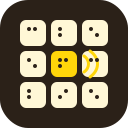
A 3 × 3 grid of nine buttons. Each button carries a Braille number from 1 to 9 and a colour (red, green, yellow or blue). Exactly one button makes a sound when pressed. Positions are named top-left (TL), top-centre (TC), top-right (TR), middle-left (ML), centre (MC), middle-right (MR), bottom-left (BL), bottom-centre (BC) and bottom-right (BR).
Procedure
Press the buttons one at a time, naming the position as you go ("top-left… top-centre…"), until one makes a sound. Say "that one sounds" and read its Braille number by touch: "number four". Then wait for the list of positions and press each one, repeating the position before you press it.
Common mistakes
Describing all nine buttons before searching. Only the sounding one matters, and only its number and colour.
Vague positions like "the first one" or "top side". Use the nine fixed names and nothing else.
Pressing the sounding button again out of habit instead of the pattern.
Losing track of which positions are already pressed when Chaos interrupts. Call them off a list.
Solver
Enter what you see on the bomb and get the action for the current state.