
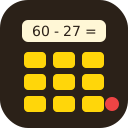
Calculator
DraftAn equation, a shuffled Braille keypad and a hidden LED. Enter the result first; then colour and parity pick one final key.
First appears in level 5
How to recognise it
A small display showing a sum or a difference ("60 − 27 ="), a nine-key keypad whose digits are shuffled on every board and labelled in Braille, and an LED next to the keypad that stays dark until the first entry is accepted.
Procedure
Stage one: type the raw result on the keypad. Hover the keys to find the digits, they are not where a phone keypad has them. Stage two: wait for the final digit, find that key, press it once. Treat "zero" as a real answer.
Common mistakes
Waiting for an LED before entering the result. In stage one there is none.
Checking parity on the final digit instead of the raw result.
A slip in the arithmetic. It corrupts the parity and everything after it; have a second person check.
Pressing the usual keypad position instead of the printed digit. The layout is shuffled.
Solver
Enter what you see on the bomb and get the action for the current state.